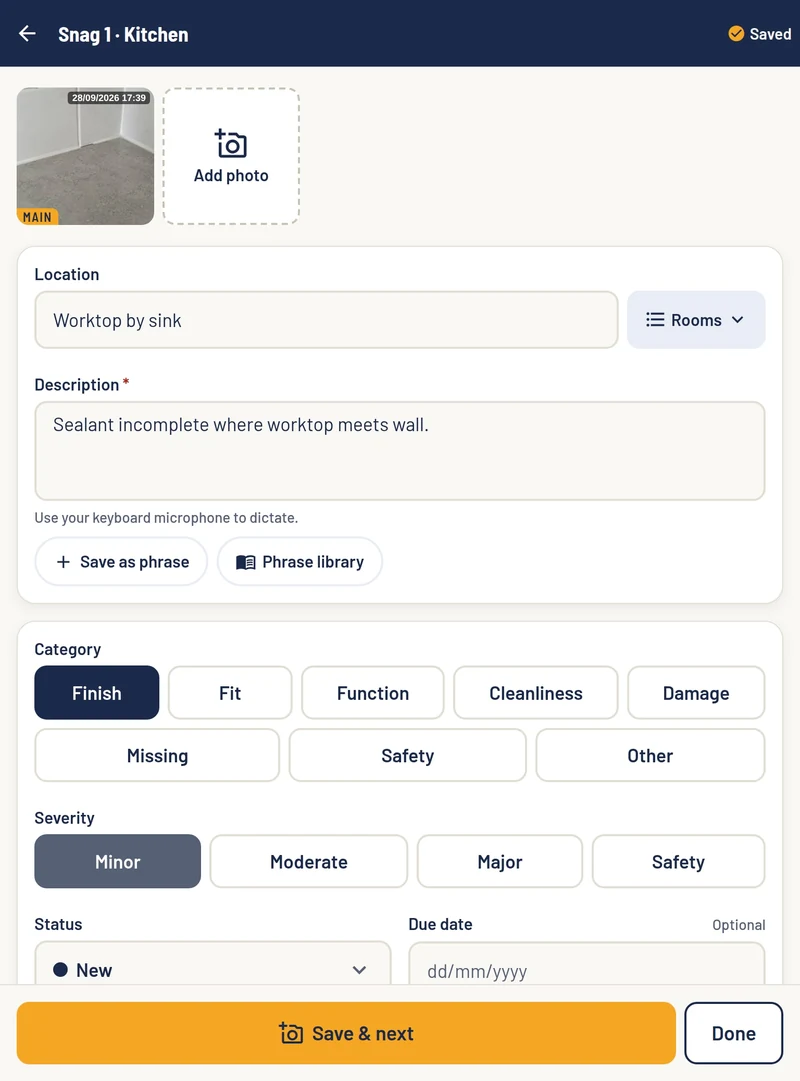
SnagPad on an iPad: snag 1 in the kitchen, with its date-stamped photo, location, description, phrase library, category and severity

SnagPad Pro · for snagging inspectors

Big on detail.
Light on admin.

Capture every snag on site, even with no signal. Then turn your notes into a professional report and snag tracker.

Coming soon on theApp Store
Coming soon onGoogle Play
  • NHQB checklistHouse and flat editions
  • AI that writes it rightOn the website, after you upload
  • Pre-saved phrasesTap a phrase, skip the typing
  • Report and trackerPDF plus a spreadsheet

Two inspections, one app

Pre-Completion and Post-Completion inspections

Pick the inspection when you start the job. Then pick house or flat, and SnagPad sets the job up for you.

01 · Before the keys

NHQB Pre-Completion Inspection

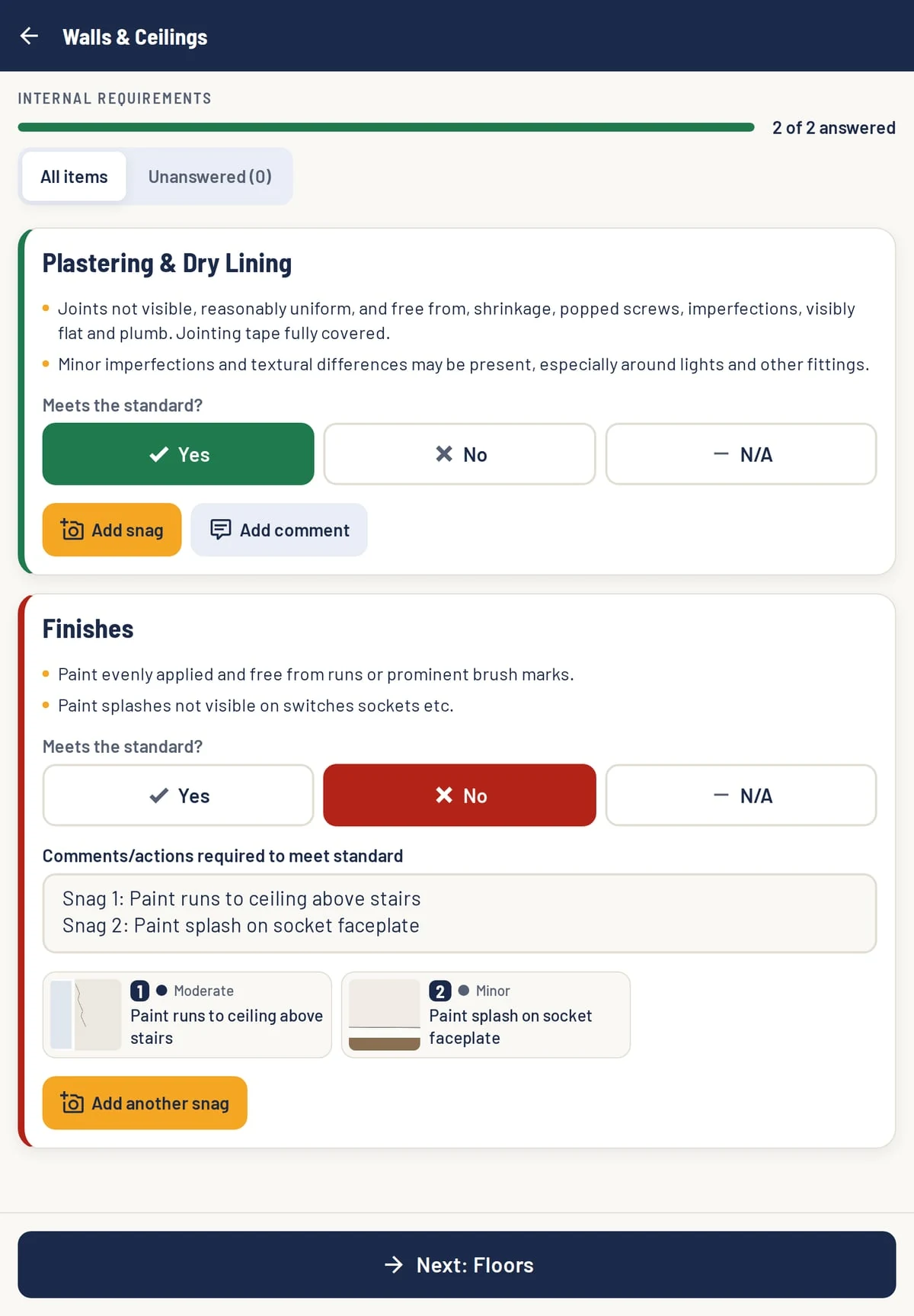
Work through the NHQB checklist section by section. Mark each item Yes, No or N/A against the standard, and add snags with photos right under the item.

  • The checklist's own sections and wording
  • Filter to the items you haven't answered yet
  • Your own rooms added to Room by Room
The NHQB checklist in SnagPad: Walls and Ceilings, with Plastering marked Yes and Finishes marked No with two snags
02 · After moving in

Post-Completion Inspection

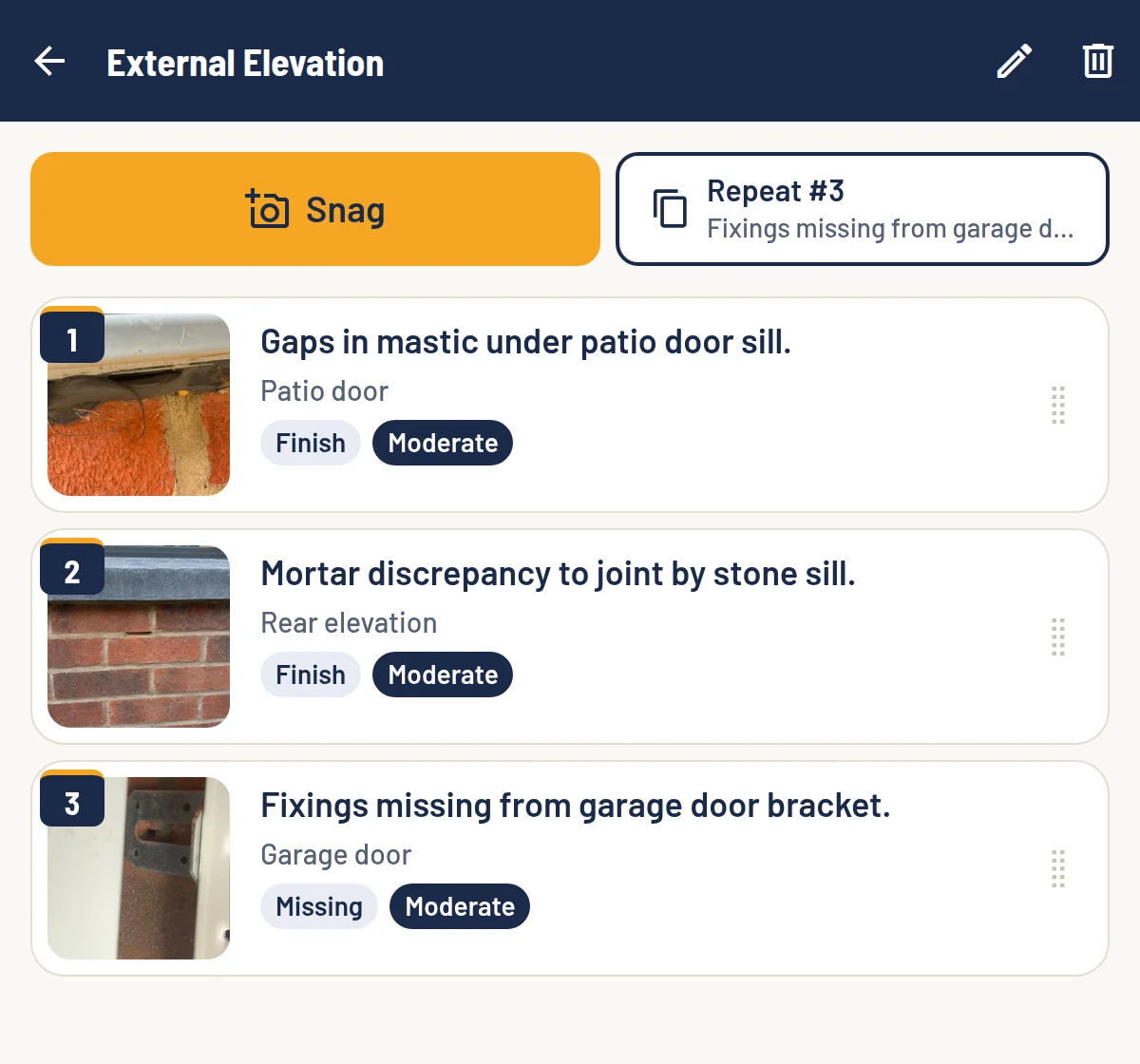
A full snagging survey, room by room and outside. Take the photo first, then add a few words. Repeat the last snag in one tap when the same issue turns up again.

  • Rooms and outside areas in the order you walk them
  • Status, due date and who it's assigned to
  • Snags numbered automatically
The external elevation in SnagPad with three numbered snags: gaps in mastic under the patio door sill, a mortar discrepancy to a joint by the stone sill, and fixings missing from the garage door bracket, each with a photo, category and severity, and a button to repeat the last snag

From site to client

From site notes to finished report

The app does the capture on site. The website does the writing up once you're back in signal.

  1. 01In the app · no signal needed

    Capture it.

    Photo first, then a few words. Type, dictate with your keyboard's microphone, or pick a phrase from your library.

  2. 02In the app · when you're back in signal

    Send it.

    Tap Send to SnagPad. The job uploads photo by photo, so a dropped connection just picks up where it left off.

  3. 03On the website

    Review it.

    AI turns each short note into full report wording. You read every one, edit what needs it and approve it.

  4. 04On the website

    Deliver it.

    Make the finished PDF report and snag tracker, with your logo and colours, ready to send to your client.

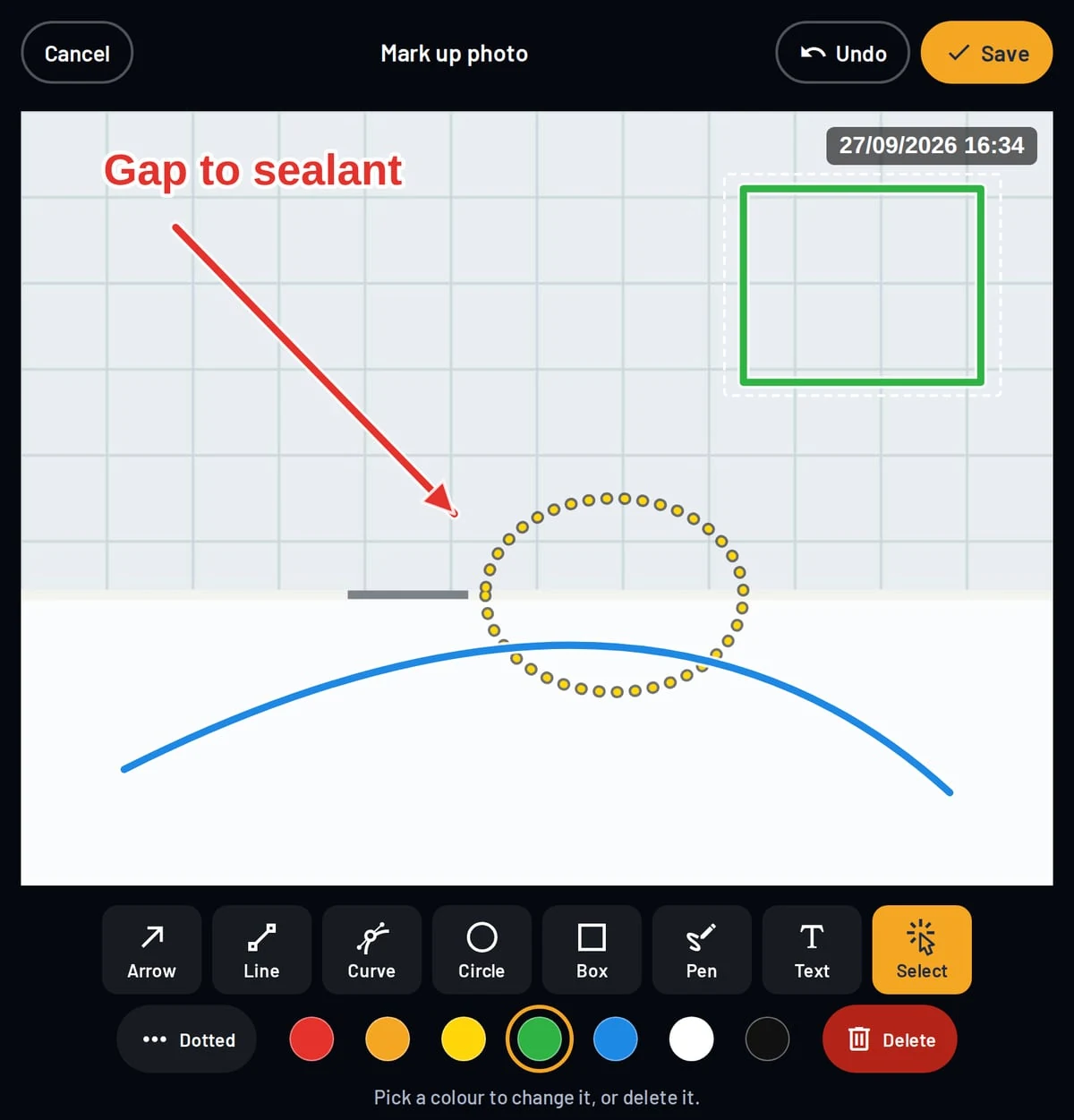
Marking up a photo in SnagPad with an arrow, text, a dotted circle and a box, stamped with the date and time

Evidence that speaks for itself

Marked-up, date-stamped photos

Mark up any photo with arrows, lines, curves, circles, boxes and text, in the colour you pick. Every snag photo is stamped with the date and time it was taken.

Photos
As many per snag as you need, from the camera or your library
Phrase library
Save the wording you use every week and reuse it in a tap
Your details
Logo and signature set once in Settings, on every job

AI wording

Report wording you check and approve

It happens on SnagPad.co.uk once you've uploaded the job, not in the app. Nothing reaches your client until you've approved it.

1 Your note on site

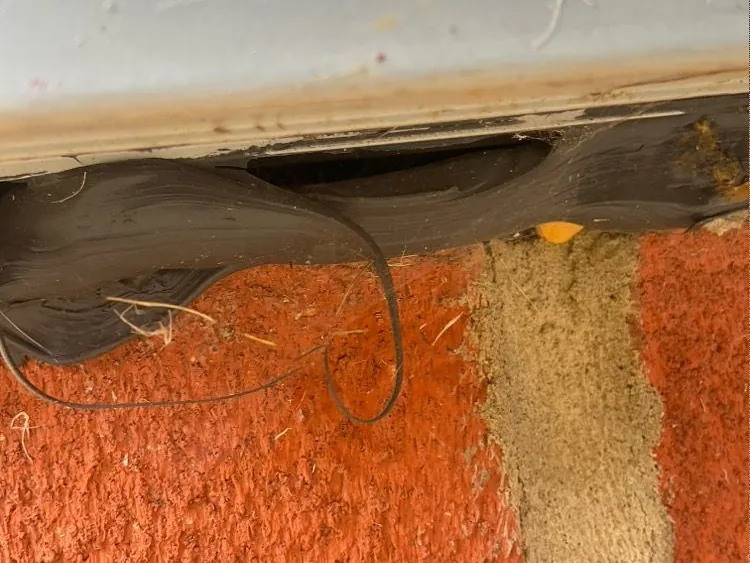
Photo of gaps in the mastic beneath a patio door sill, with a loose strand of mastic hanging down

Patio door · Snag 6 · Finish · Moderate

Gaps in mastic under patio door sill.

2 Draft for your review

Gaps in mastic under the patio door sill

Observation

The mastic seal beneath the patio door sill is incomplete, with gaps leaving the joint under the sill open.

Relevant guidelines

NHBC Standards, Clause 6.7.3.3 Accommodating movement: the perimeter gap around door and window frames “should be sealed with a suitable material which is able to resist water penetration and prevent air leakage whilst accommodating any differential movement requirements”.

Recommended action

Remove the defective mastic and reseal the joint beneath the sill with a suitable sealant, giving a continuous, weathertight seal.

An example with prepared wording, to show how it works.

What your client gets

Your PDF report and snag tracker

A branded PDF report that opens with the inspection at a glance, and a tracking spreadsheet that opens in Excel or Numbers.

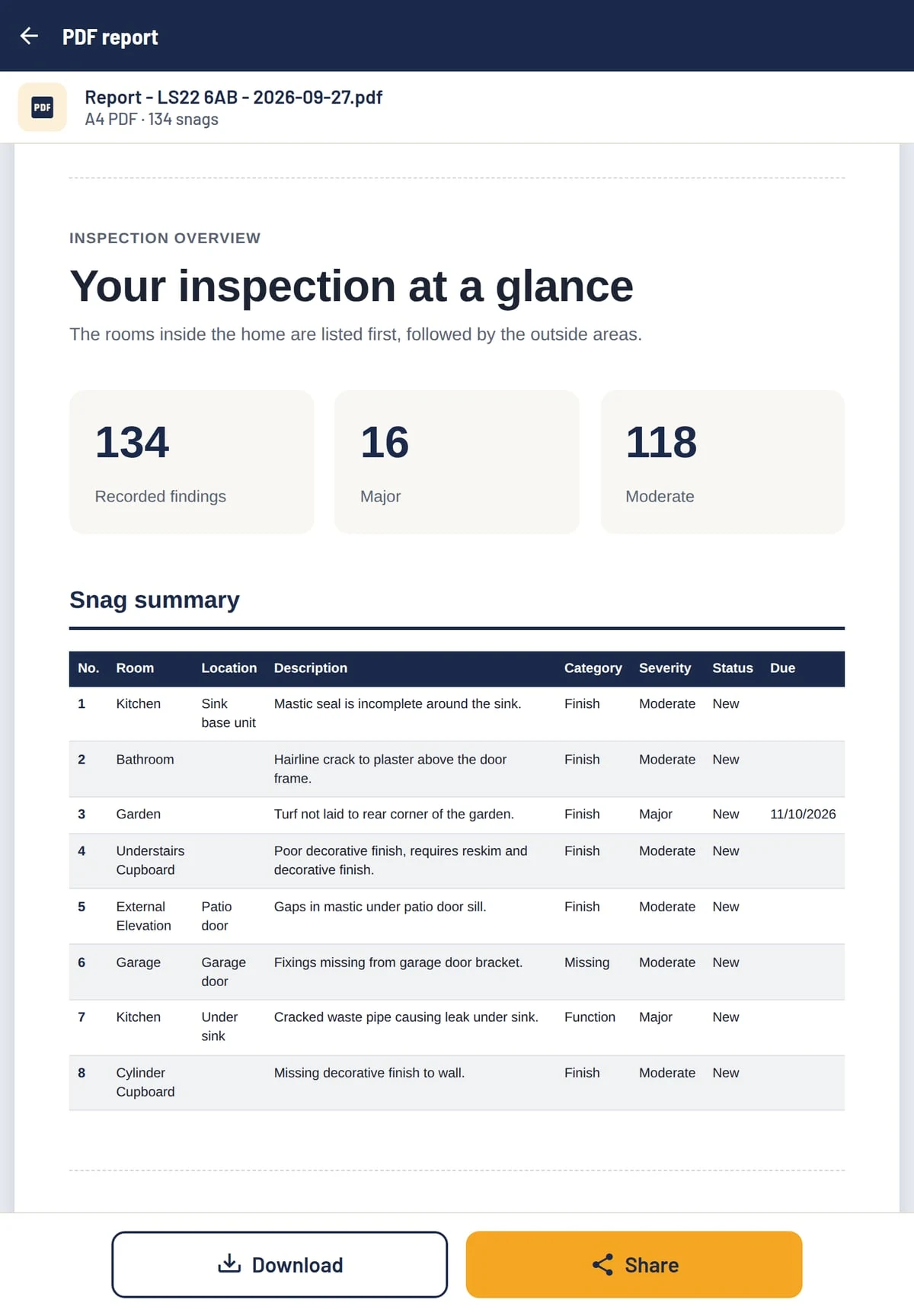
The PDF report: Your inspection at a glance, with 134 recorded findings, 16 major and 118 moderate, and the snag summary table
PDF report Cover, at-a-glance dashboard, snag summary and every snag in detail with its photos. Switch sections on or off in Settings.
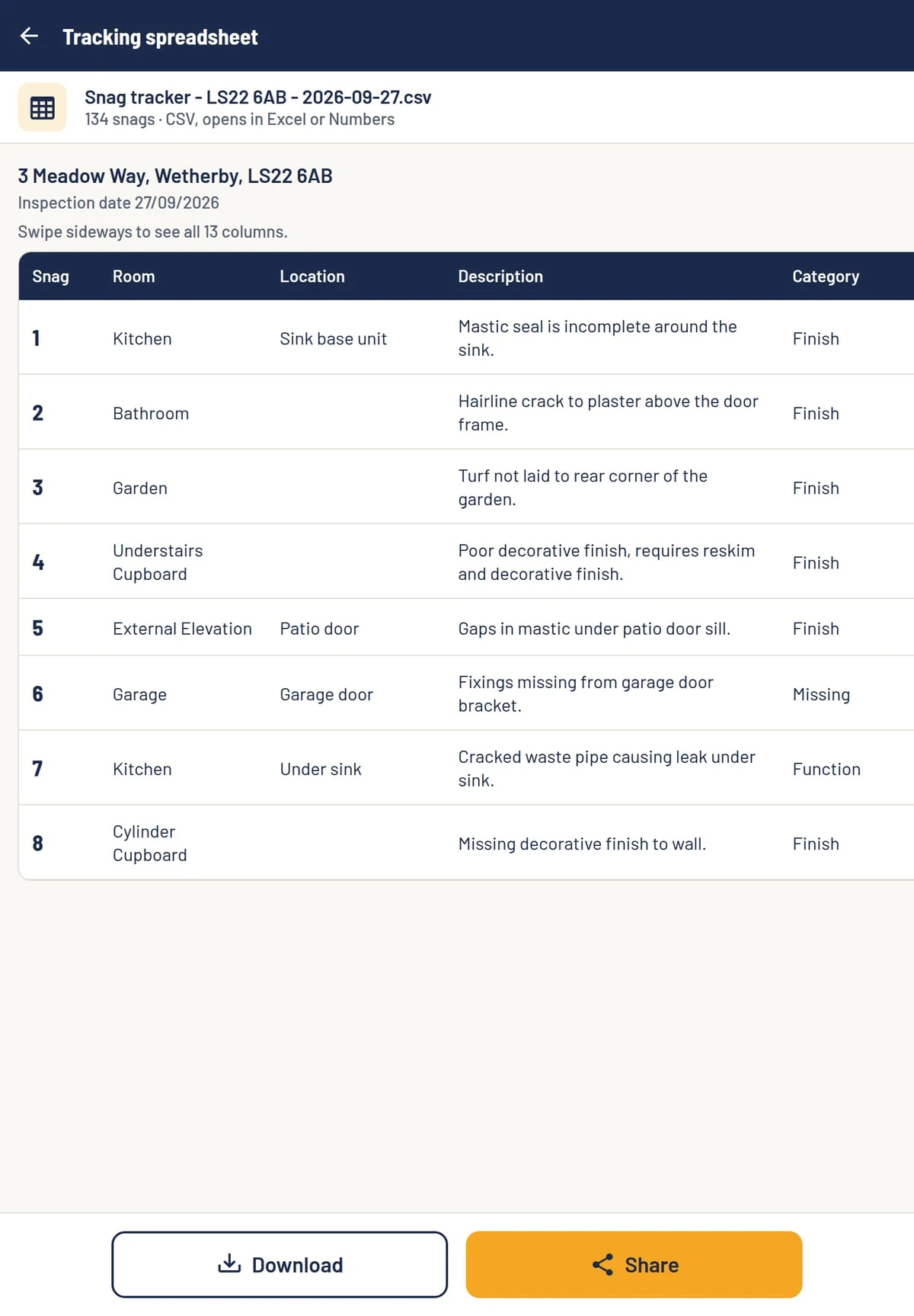
The tracking spreadsheet: snag number, room, location, description and category for eight snags
Snag tracker Every snag in one row, with room, location, category, severity, status, due date and who it's assigned to.
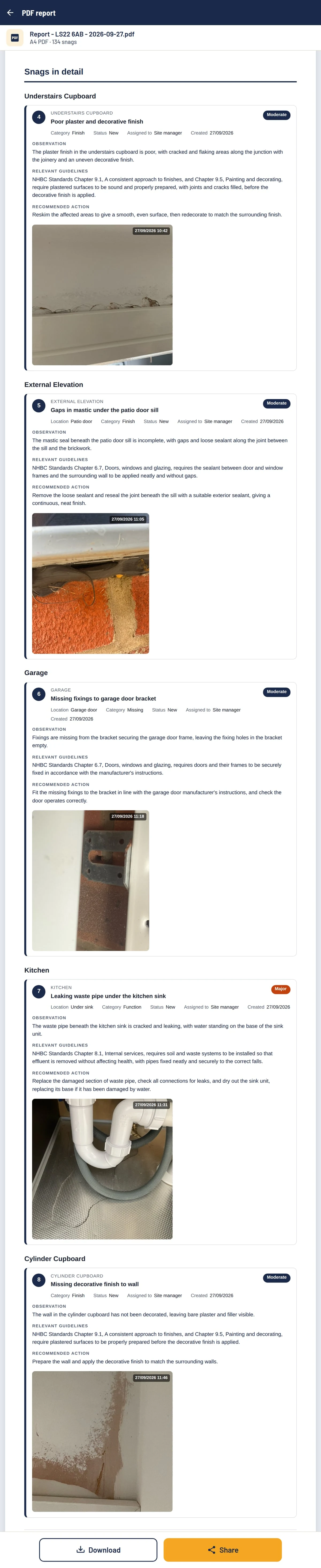
Snags in detail from the PDF report: snags 4 to 8, understairs cupboard finish, mastic under the patio door sill, garage door bracket fixings, cracked waste pipe under the kitchen sink and cylinder cupboard wall, each with its approved wording (observation, relevant guidelines and recommended action) and date-stamped photo
Snags in detail Every snag gets its own card in the report, with your approved wording (observation, relevant guidelines and recommended action) and its date-stamped photos. Scroll to see more.
See the whole thing. Open a complete sample report, a sample NHQB Pre-Completion report and a tracker. All use sample data and are clearly labelled as samples.

Pricing

Choose your plan

Start with the app, add the AI reports when you want them. Pay yearly and get two months free.

SnagPad App

For capturing every snag on site.

£39per month

Or £390 billed annually, saving £78

You get: a PDF report and snag tracker created on your phone or tablet, in your own words.

  • NHQB Pre-Completion and Post-Completion inspections
  • Works on site with no signal
  • Photos with markup and date stamp
  • Phrase library to speed up your notes
  • PDF report with your logo, plus a snag tracker, made in the app
Coming soon

Company

For firms with a team of surveyors.

£449per month

Or £4,490 billed annually, saving £898

£44.90 per surveyor a month with all 10 places filled, against £59 each on App + AI reports. That saves £141 a month.
  • App + AI reports for up to 10 surveyors
  • 10% bonus Homeply lead credit, up to £10 a month (see below)
  • Your company logo and colours on every surveyor's reports
  • Every surveyor's jobs in one company dashboard
  • One invoice for the whole team

Prices in pounds sterling.

Company plan enquiry

Tell us about your team and we'll set up your company account and send an invoice.

Find your next customer with

Homeply connects homeowners with local snagging surveyors. Link your account and receive 10% bonus credit whenever you buy Homeply lead credit, giving you more to spend on new enquiries.

Up to £10 bonus credit per month. Included with an active App + AI reports or Company subscription.

Visit homeply.co.uk (opens in a new tab)

FAQs

Questions surveyors ask

Does SnagPad work on site with no signal?

Yes. The app works fully offline, so you can capture snags, photos and checklist answers anywhere. On the App + AI reports plan, you upload the job to SnagPad.co.uk once you're back in signal.

Is the AI in the app?

No. The app records your own notes. AI wording happens on SnagPad.co.uk after you upload a job, on the App + AI reports and Company plans.

Do I have to use the AI wording?

No. Every suggestion waits for you to edit or approve it, and nothing reaches your client until you have. You can also write or change any wording yourself.

Which inspections does SnagPad cover?

NHQB Pre-Completion inspections, using the checklist's own house and flat editions, and Post-Completion snagging surveys room by room and outside.

What does my client receive?

A PDF report with your logo on it, and a snag tracker spreadsheet that opens in Excel or Numbers.

How many surveys can I keep online?

Up to 10 at a time on App + AI reports. When you reach 10, delete an older survey to make room for a new one.

Which devices can I use?

iPhone, iPad and Android phones and tablets. SnagPad is coming soon to the App Store and Google Play.

How does the Company plan work?

It covers up to 10 surveyors on App + AI reports, with your company logo and colours on every report and one invoice for the team. Use the Contact us form to set it up.

Less admin.
More surveying.

Built by snagging surveyors, for the way you work.

Coming soon to iOS and Android phones and tablets.

Coming soon on theApp Store
Coming soon onGoogle Play